This quick tutorial explains how to use HTML, JavaScript, and/or PHP to enable visitors to “go back” to the previous page. You can use either method to add a simple “go back” link or form button to your web pages. Continue reading »
URLs frequently employ potentially conflicting characters such as question marks, ampersands, and pound signs. Fortunately, it is possible to encode such characters via their escaped hexadecimal ASCII representations. For example, we would write ? as %3F. Here are a few more URL character codes (case-insensitive), for easy copy/paste reference. Continue reading »
![[ Macromedia Flash ]](https://perishablepress.com/wp/wp-content/images/2007/misc-chunks/embed-fash-video-object.png)
Here is a collection of code snippets for embedding Flash and video using the HTML <object></object> tag. Useful for sites showcasing dynamic multimedia content. Continue reading »
Behold the seventh wonder of the virtual world: max/min-height and max/min-width properties are possible in Internet Explorer! Indeed, by taking advantage of IE’s proprietary CSS attribute, expression, you too can whip IE widths and heights into desirable proportions. The CSS expression attribute enables JavaScript commands to be executed within Internet Explorer. JavaScript via CSS? Thanks, Microsoft! Continue reading »
In our previous article on creating spamless email links via JavaScript, the presented method, although relatively simple to implement, is not the most effective solution available. Spambots, email harvesters, and other online scumbags relentlessly advance their scanning technology, perpetually rendering obsolete yesterday’s methods. Continue reading »
Hiding and filtering CSS rules for specifically targeted browsers is often a foregone conclusion when it comes to cross-browser design considerations. Rather than dive into some lengthy dialogue concerning the myriad situations and implications of such design hackery, our current scheduling restraints behoove us to simply cut to the chase and dish the goods. Having said that, we now consider this post a perpetually evolving repository of CSS filters.. Continue reading »
By using an <iframe></iframe> within a <div></div>, it is possible to include external web content in most any web document. This method serves as an excellent alternative to actual frames, which are not as flexible and definitely not as popular. Indeed, with CSS, the placement, sizing, and styling of div’s provides endless possibilities for embedding external or even internal web content into pages that would otherwise require the use of frames, Flash, or JavaScript. This method works on any modern […] Continue reading »
After digging through the WordPress source code, I stumbled upon this very useful JavaScript method for auto-focusing form elements upon page load. Here is the JavaScript code (place within the document head): Continue reading »
![[ WordPress Triple Loop ]](https://perishablepress.com/wp/wp-content/images/2006/misc-chunks/wordpress-triple-loop.jpg)
Two of the themes developed by Perishable Press, Apathy and Information, depend on three WordPress loops to operate as intended. For each of these themes, the three loops consist of two “side” loops and one main loop. The side loops each display posts from one specific category, while the main loop displays posts from every category not specified in the side loops. Continue reading »
Apparently, article posting is painfully slow on 2-ish versions of WordPress. Indeed, we finally got tired of waiting several minutes every time we published, saved, or edited a post. After a bit of research, reading through countless complaints and suggested remedies, several key methods began to emerge. And, after taking the time to implement them, we have definitely enjoyed an substantial decrease in time required to publish, save, or edit posts. Continue reading »
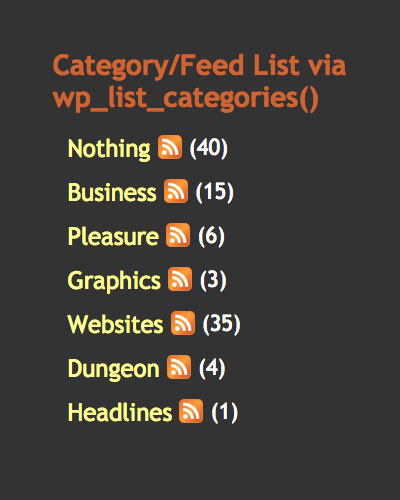
This brief tutorial explains two methods for adding RSS feed link icons to category listings. Let’s say that you have a list of category links, where each link targets a specific category view. Now let’s say that, next to each category link, you would like to provide a icon that links to that particular category’s syndicated feed. So, rather than cluttering up your page with two sets of category links — one for category views and another for category feeds […] Continue reading »
![[ minimalist Theme ]](https://perishablepress.com/wp/wp-content/images/themes/minimalist_.jpg)
The minimalist theme is crisp and clean. Featuring a three-column satellite menu-page to reduce clutter and streamline usability, the minimalist theme is designed to present site content with sophistication and elegance. The minimalist theme is XHTML 1.1 strict, employs nearly valid CSS (ha!), and features browser-safe colors and universal fonts all delivered via concise, two-column liquid layout. Mindfully detailed and carefully prepared, the minimalist theme provides plenty of room for customization and expansion. One of my favorite theme designs. Continue reading »
Consider this post an evolving receptacle for Firefox-specific CSS tricks. Continue reading »
Gravatars have become a popular way of adding spice to the “comments” page of many WordPress-powered sites. So popular, in fact, that the gravatar server is often overloaded, bogged down with millions of gravatar requests every second. This immense server load effects user pages everywhere, resulting in slow loading times, unresolved server requests, and missing gravatars. Such broken presentations appear unprofessional, tarnish reputations, and may provoke confusion. This article provides essential solutions for an extreme gravatar makeover.. Continue reading »
Welcome to Perishable Press! This article explains several methods for opening multiple frames with a single link. For more excellent HTML information, check out the HTML category archive. If you like what you see, I encourage you to subscribe to Perishable Press for a periodic dose of online enlightenment ;) Continue reading »
WordPress Quicktags provide shortcuts for adding certain bits of code to your posts. The default set of quicktags includes some handy shortcut buttons for tags such as <strong></strong>, <a></a>, and <img />, as well as a few others. While the default set of quicktag buttons is occasionally useful, a quick bit of quicktag customization can easily transform your personal set of quicktag buttons into a deadly arsenal of time-saving code shortcuts. Continue reading »

 Perishable Press is operated by Jeff Starr, a professional web developer and book author with two decades of experience.
Here you will find posts about web development, WordPress, security, and
Perishable Press is operated by Jeff Starr, a professional web developer and book author with two decades of experience.
Here you will find posts about web development, WordPress, security, and 