Behold the ubiquitous list elements, <ul></ul> and <ol></ol>! These two sexy elements help millions of websites display lists of information in clean, semantic fashion. Without them, we’d be crawling around like filthy cavemen, eating dirt and howling at the moon. But these list elements aren’t just sexy, they are also extremely flexible, enabling us humble designers to create robust list configurations that are semantically versatile and highly customizable. We all know how to throw down a basic list: Continue reading »
![[ Electrical Surge ]](https://perishablepress.com/wp/wp-content/images/2009/misc-chunks/html-css-power.jpg)
Web designers can do some pretty cool stuff with HTML 4 and CSS 2.1. We can structure our documents logically and create information-rich sites without relying on archaic, table-based layouts. We can style our web pages with beauty and detail without resorting to inline <font></font> and <br /> tags. Indeed, our current design methods have taken us far beyond the hellish era of browser wars, proprietary protocols, and those hideous flashing, scrolling, and blinking web pages. Thankfully, those days are over. As […] Continue reading »
When developing the colorful Quintessential Theme (opens in new tab), I initially planned on displaying five random posts from each of my most popular tags and categories in the super-slick sliding-panel sidebar. Because I am running an older version of WordPress, however, this task proved to be quite the educational experience. In newer versions (from 2.5 I think) of WordPress, the query_posts() function enables users to display posts in random order using the orderby=rand parameter. This would have made my […] Continue reading »
![[ Dynamic Flow ]](https://perishablepress.com/wp/wp-content/images/2009/misc-chunks/dynamic-linkage.jpg)
In my recent guest post at The Nexus, I discuss Google’s new nofollow policy and suggest several ways to deal with it. In that article, I explain how Google allegedly has changed the way it deals with nofollow links. Instead of transferring leftover nofollow juice to remaining dofollow links as they always have, Google now pours all that wonderful nofollow juice right down the drain. This shift in policy comes as a terrible surprise to many webmasters and SEO gurus, […] Continue reading »
![[ Screenshot: The Legion of Doom ]](https://perishablepress.com/wp/wp-content/images/2009/misc-chunks/multiple-addresses.jpg)
Let’s face it. There’s just as much scum on the Internet as there is out there in the “real world.” Maybe even more, who knows. From scammers and spammers to scrapers and crackers, the Web is just crawling with all sorts of pathetic scumbags. As predictably random as much of the malicious activity happens to be, it is virtually guaranteed that you will be hounded by at least a few persistent IP addresses that, for whatever reason, have latched on […] Continue reading »
Normally, when visitors post a comment to your site, specific types of client data are associated with the request. Commonly, a client will provide a user agent, a referrer, and a host header. When any of these variables is absent, there is good reason to suspect foul play. For example, virtually all browsers provide some sort of user-agent name to identify themselves. Conversely, malicious scripts directly posting spam and other payloads to your site frequently operate without specifying a user […] Continue reading »
When designing sites, it is often useful to identify different pages by adding an ID attribute to the <body></body> element. Commonly, the name of the page is used as the attribute value, for example: <body id="about"></body> In this case, “about” would be the body ID for the “About” page, which would be named something like “about.php”. Likewise, other pages would have unique IDs as well, for example: <body id="archive"> </body><body id="contact"> </body><body id="subscribe"> </body><body id="portfolio"></body> ..again, with each ID associated […] Continue reading »
![[ Screenshot: WP Default Database Error Page ]](https://perishablepress.com/wp/wp-content/images/2009/install-security/h4x0rd_03.gif "Error establishing a database connection")
The other day, my server crashed and Perishable Press was unable to connect to the MySQL database. Normally, when WordPress encounters a database error, it delivers a specific error message similar to the following: Continue reading »
Importing and displaying external RSS feeds on your site is a great way to share your online activity with your visitors. If you are active on Flickr, Delicious, Twitter, or Tumblr, your visitors will enjoy staying current with your updates. Many social media sites provide exclusive feeds for user-generated content that may be imported and displayed on virtually any web page. In this article, you will learn three ways to import and display feed content on your WordPress-powered website — […] Continue reading »
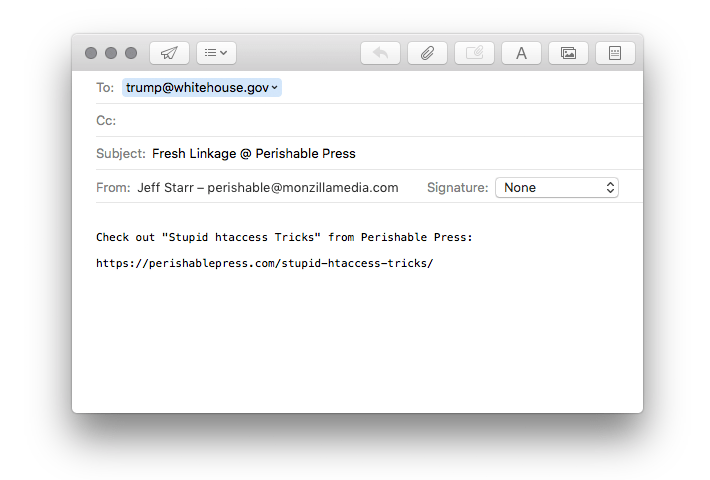
In addition to your choice collection of “Share This” links, you may also want to provide visitors with a link that enables them to quickly and easily send the URL permalink of any post to their friends via email. This is a great way to increase your readership and further your influence. Just copy & paste the following code into the desired location in your page template: <a href="mailto:?subject=Fresh%20Linkage%20@%20Perishable%20Press&body=Check%20out%20<?php the_permalink(); ?>%20from%20Perishable%20Press" title="Send a link to this post via email" rel="nofollow">Share […] Continue reading »
Check out this sweet composition of aural styles discovered in the stylesheet for the W3C’s website: /* AURAL STYLES (via W3C) */ @media aural { h1, h2, h3, h4, h5, h6 { voice-family: paul, male; stress: 20; richness: 90 } h1 { pitch: x-low; pitch-range: 90 } h2 { pitch: x-low; pitch-range: 80 } h3 { pitch: low; pitch-range: 70 } h4 { pitch: medium; pitch-range: 60 } h5 { pitch: medium; pitch-range: 50 } h6 { pitch: medium; pitch-range: […] Continue reading »
Canonical URLs are important for maintaining consistent linkage, reducing duplicate content issues, and increasing the overall integrity of your site. In addition to cleaning up trailing slashes and removing extraneous index.php and index.html strings, removing the www subdirectory prefix is an excellent way to shorten links and deliver consistent, canonical URLs. Of course, an optimal way of removing (or adding) the www prefix is accomplished via HTAccess canonicalization: Continue reading »
One of the oldest JavaScript tricks in the book involves providing a “print this!” link for visitors that enables them to summon their operating system’s default print dialogue box to facilitate quick and easy printing of whatever page they happen to be viewing. With the old way of pulling this little stunt, we write this in the markup comprising the target “print this!” link in question: Continue reading »
Shortest post ever! You can quickly and easily apply transparency to any supportive element by adding the following CSS code your stylesheet: selector { filter: alpha(opacity=50); /* internet explorer */ -khtml-opacity: 0.5; /* khtml, old safari */ -moz-opacity: 0.5; /* mozilla, netscape */ opacity: 0.5; /* fx, safari, opera */ } Check the code comments to see what’s doing what, and feel free to adjust the level of transparency by editing the various property values. Also, remember to replace “selector” […] Continue reading »
![[ CSS3 ]](https://perishablepress.com/wp/wp-content/images/2008/misc-chunks/css-logo.jpg)
I have written previously on the fine art of preloading images without JavaScript using only CSS. These caching techniques have evolved in terms of effectiveness and accuracy, but may be improved further to allow for greater cross-browser functionality. In this post, I share a “CSS-only” preloading method that works better under a broader set of conditions. Previous image-preloading techniques target all browsers, devices, and media types. Unfortunately, certain browsers do not load images that are hidden directly (via the <img […] Continue reading »
![[ Image: Abstract Mathematical Diagram ]](https://perishablepress.com/wp/wp-content/images/2009/misc-chunks/temp-redirect.jpg)
In my previous article on temporarily redirecting visitors during site updates, I present numerous PHP and HTAccess methods for handling traffic during site maintenance, updates, and other temporary periods of downtime. Each of the PHP methods presented in the article allow for access from a single IP while redirecting everyone else. In this article, we modify our previous techniques to allow access for multiple IP addresses while temporarily redirecting everyone else to the page of our choice. Plus, while we’re […] Continue reading »

 Perishable Press is operated by Jeff Starr, a professional web developer and book author with two decades of experience.
Here you will find posts about web development, WordPress, security, and
Perishable Press is operated by Jeff Starr, a professional web developer and book author with two decades of experience.
Here you will find posts about web development, WordPress, security, and