![[ WordPress Triple Loop ]](https://perishablepress.com/wp/wp-content/images/2006/misc-chunks/wordpress-triple-loop.jpg)
Two of the themes developed by Perishable Press, Apathy and Information, depend on three WordPress loops to operate as intended. For each of these themes, the three loops consist of two “side” loops and one main loop. The side loops each display posts from one specific category, while the main loop displays posts from every category not specified in the side loops. Continue reading »
Apparently, article posting is painfully slow on 2-ish versions of WordPress. Indeed, we finally got tired of waiting several minutes every time we published, saved, or edited a post. After a bit of research, reading through countless complaints and suggested remedies, several key methods began to emerge. And, after taking the time to implement them, we have definitely enjoyed an substantial decrease in time required to publish, save, or edit posts. Continue reading »
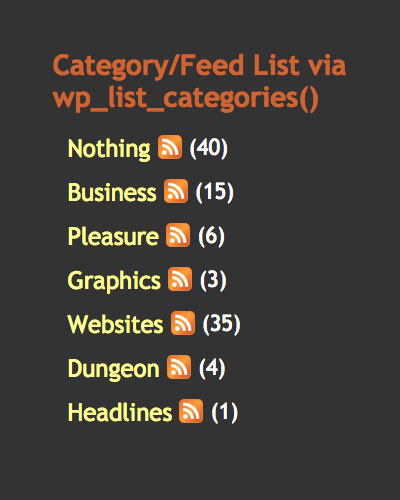
This brief tutorial explains two methods for adding RSS feed link icons to category listings. Let’s say that you have a list of category links, where each link targets a specific category view. Now let’s say that, next to each category link, you would like to provide a icon that links to that particular category’s syndicated feed. So, rather than cluttering up your page with two sets of category links — one for category views and another for category feeds […] Continue reading »
![[ Preloaded Image via CSS + JavaScript ]](https://perishablepress.com/wp/wp-content/images/2006/misc-chunks/mandala-stamp-vintage.jpg)
Fast-loading pages reduce errors, conserve bandwidth, and please visitors. One way to decrease loading times and enhance performance involves maximizing image display efficiency. Your mantra for achieving image efficiency should be “reuse, optimize, and preload.”. While each of these methods plays an important role, this article will focus on methods for preloading images. Consult your server error logs to identify web pages that may require image help. Note: preloading images does not reduce bandwidth! It only decreases apparent load time, […] Continue reading »
Consider this post an evolving receptacle for Firefox-specific CSS tricks. Continue reading »
![[ AddMySite ]](https://perishablepress.com/wp/wp-content/images/2006/misc-chunks/addmysite.png)
The AddMySite (AMS) plugin for WordPress makes it easy for your visitors to add your site and feed to all of their favorite social-bookmarking services. Share instantly with awesome sites like Facebook, LinkedIn, Google Plus, and Twitter. With a few clicks, users can quickly bookmark or add your site to over 20 popular social bookmarking services. It’s like a dream come true for simple social-media sharing. Simple, fast, and easy :) Continue reading »
Gravatars have become a popular way of adding spice to the “comments” page of many WordPress-powered sites. So popular, in fact, that the gravatar server is often overloaded, bogged down with millions of gravatar requests every second. This immense server load effects user pages everywhere, resulting in slow loading times, unresolved server requests, and missing gravatars. Such broken presentations appear unprofessional, tarnish reputations, and may provoke confusion. This article provides essential solutions for an extreme gravatar makeover.. Continue reading »
Welcome to Perishable Press! This article explains several methods for opening multiple frames with a single link. For more excellent HTML information, check out the HTML category archive. If you like what you see, I encourage you to subscribe to Perishable Press for a periodic dose of online enlightenment ;) Continue reading »
Search engine optimization (SEO) is the business of every serious webmaster. The process of optimizing a website for the search engines involves much more than properly constructed document headers and anchor tags. Websites are like trees: their roots are the growing collection of content presented through the branching universe of the World Wide Web. Or something. The point is that optimizing a website requires nurturing the site itself while also ensuring proper exposure to the requisite elements of the internet. Continue reading »
Keywords play a vital role in search engine optimization (SEO), and — if used properly — have the potential to increase the flow of traffic to your site. It is beneficial to maintain an active list of keywords for each of your websites. Each list should be a continually evolving set of important, relevant keywords. The idea here is to develop a consistent practice of actively seeking better keywords, thereby producing your very own customized keyword library. Continue reading »
WordPress Quicktags provide shortcuts for adding certain bits of code to your posts. The default set of quicktags includes some handy shortcut buttons for tags such as <strong></strong>, <a></a>, and <img />, as well as a few others. While the default set of quicktag buttons is occasionally useful, a quick bit of quicktag customization can easily transform your personal set of quicktag buttons into a deadly arsenal of time-saving code shortcuts. Continue reading »
Changing the color of scrollbars for Internet Explorer may very well be the oldest trick in the book. In fact, this post exists mostly for the sake of prosperity, as we here at Perishable Press strive to eliminate our entire offline library of website design notes by transferring them to the World Wide Web. Although library conversion requires time, patience, and determination, changing the color of IE scrollbars is relatively simple. Simply associate these CSS rules to the (X)HTML documents […] Continue reading »

Welcome to my growing collection of WordPress plugins. Most of these plugins are freely available at the WP Plugin Directory, and some are premium plugins available at Plugin Planet. My plugins strive for perfection, and feature excellent customer support. If you have any questions or feedback, reach me anytime via my contact form — I’m always glad to help. Continue reading »
Ever since Internet Explorer 5 (IE5), Microsoft has included browser support for “downlevel conditional comments”, a non-scripted method of browser detection. Downlevel conditional comments (DCC) are a useful tool for targeting directives to specific versions of Internet Explorer. Downlevel conditional comments consist of an opening statement and a closing statement. Taken together, the statements may enclose markup, CSS, JavaScript, or any other element typically included within an (X)HTML document. The DCC may be placed anywhere within the document and executes […] Continue reading »
This nifty CSS link hover effect magically reveals a hidden span of text after specified links. The trick employs an anonymous span nested within an anchor tag. CSS then acts upon the markup with a set of rules that basically says hide the nested span until the link is hovered. Continue reading »
Using a small bit of JavaScript, it is possible to auto-clear and restore form elements when users bring focus to them. Simply copy, paste, and modify the following code example to achieve an effect similar to this: Continue reading »

 Perishable Press is operated by Jeff Starr, a professional web developer and book author with two decades of experience.
Here you will find posts about web development, WordPress, security, and
Perishable Press is operated by Jeff Starr, a professional web developer and book author with two decades of experience.
Here you will find posts about web development, WordPress, security, and