
WordPress Tip: Valid, SEO-Friendly Email Permalink Buttons
In addition to your choice collection of “Share This” links, you may also want to provide visitors with a link that enables them to quickly and easily send the URL permalink of any post to their friends via email. This is a great way to increase your readership and further your influence. Just copy & paste the following code into the desired location in your page template:
<a href="mailto:?subject=Fresh%20Linkage%20@%20Perishable%20Press&body=Check%20out%20<?php the_permalink(); ?>%20from%20Perishable%20Press" title="Send a link to this post via email" rel="nofollow">Share this post via email</a>Within the code, you will need to edit both instances of the string “Perishable%20Press” to reflect your own site name. Note that the “%20” is the encoded equivalent of a blank space, and is required to ensure validation of parameterized query strings. As is, the code will generate an email that is populated with the following information:
Subject: Fresh Linkage @ Perishable Press

Message:

Check out <?php the_permalink(); ?> from Perishable Press
..where the template tag, “the_permalink()” will generate the permalink to the current article. We may also use other template tags to add more information. For example, let’s add the title of the post as well as the link. Our email-link code would be written as follows:
<a href="mailto:?subject=Fresh%20Linkage%20@%20Perishable%20Press&body=Check%20out%20%22<?php the_title(); ?>%22%20from%20Perishable%20Press:%0A%0A<?php the_permalink(); ?>" title="Send a link to this post via email" rel="nofollow">Share this post via email</a>..which generates post-specific emails pre-populated with the following information:
Subject: Fresh Linkage @ Perishable Press

Message:

Check out "<?php the_title(); ?>" from Perishable Press:

<?php the_permalink(); ?>
So if a visitor liked the post, Stupid htaccess Tricks and wanted to share it with somebody via email, they would simply click the link, specify an email address, and send it off. Such an email would look similar to this:
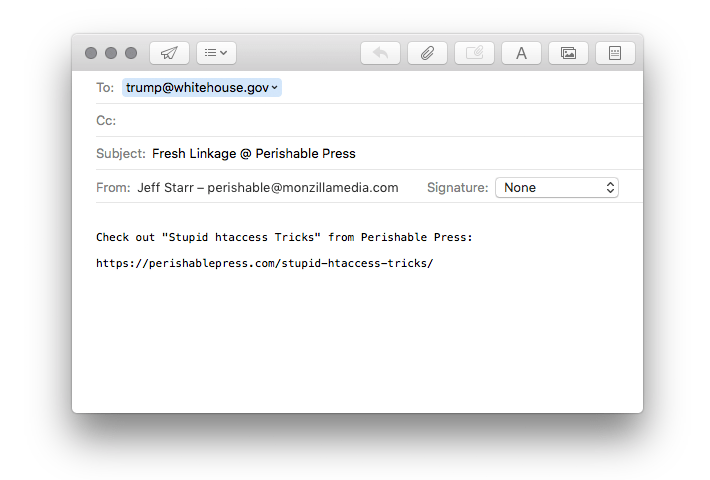
Screenshot of auto-generated post-specific email message
This is a great way to help visitors get the word out about your work. And of course, this is merely an example of what is possible with this idea; I encourage you to customize the technique to match your site’s unique persona. Once you get into formatting email messages with markup and CSS, you’ll find that the sky’s the limit!



7 responses to “WordPress Tip: Valid, SEO-Friendly Email Permalink Buttons”
The problem with this is that a lot of mail clients behave differenly with the body parameter, and that a huge share of readers use web based emails (hotmail, live, and obviously gmail) which, again, will behave differently (for instance, do you have gmail only, or gmail+some FF extension that catches mailto: links, etc…)
Good points as usual, Ozh. I almost decided against posting this article, as it has been sitting around for almost a year. I hate throwing away useful content, however, so I decided to polish it up a bit and throw it out there. Hopefully there are enough people still using clients like Outlook and Thunderbird to warrant such a simple code snippet, but I certainly agree that new and improved techniques for handling this sort of behavior are needed.
Great information, will definitely get this done on my website!
Brilliant tip. Is there a way of using PHP to pull out the title of the post to use in the subject?
Thanks again.
Hi Jonathan, yes of course — something like that would be easy to do by using something like this:
For more information on this technique, see this article.
Cheers :)
Thanks for the link- another brilliant article lies behind.
Jeff, thanks for not throwing this article away. I know sometimes it seems like too much work, but it’s usually not. Usually, it’s just 22 minutes of boring tedious work.