
IE6 Support Spectrum
I know, I know, not another post about IE6! I actually typed this up a couple of weeks ago while immersed in my site redesign project. I had recently decided that I would no longer support that terrible browser, and this tangential post just kind of “fell out.” I wasn’t sure whether or not to post it, but I recently decided to purge my draft stash by posting everything for your reading pleasure. Thus, you may see a few turds in the next few weeks, but hopefully this isn’t one of them. In any case, here is my final post on IE6..
Hypothetical Spectrum
Over the past several weeks, I have seen several unique methods of dealing with Internet Explorer 6 — conditional comments, dialogue boxes, evil scripts — you name it. As I thought about these different strategies, I began to see them as positioned along a spectrum of relative usability, accessibility and overall enthusiasm. On one end of the spectrum, we have complete usability and accessibility; on the other end of the spectrum, we find absolute resentment for the world’s slowest-dying browser, IE6. Here is an attempt to diagram this hypothetical spectrum:
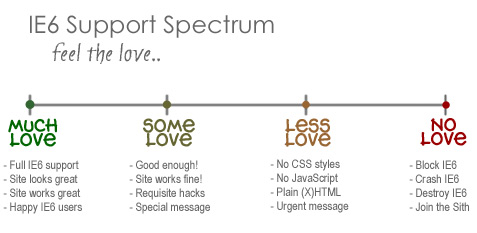
Hypothetical diagram indicating relative quantity of “love” for IE6
How much “love” do you have for IE6? Let’s find out:
A: Much Love
It takes a lot of love to get to this end of the spectrum! We’re talking full support for all aspects of your site on Internet Explorer. From proper CSS display to complete JavaScript functionality, your site shows its strong love for IE6 by looking and behaving exactly as it does in modern browsers like Firefox, Opera, and Safari. Bonus love for pixel-perfect presentation.
B: Some Love
If you are still supporting IE6, but only to the extent that the site remains usable and generally decent looking, you are showing “some love” to IE6. Sure, the margins and padding may be off here and there, and there might be some awkwardness in your form presentation, but at least you took the time to conditionally apply the clearfix hack, min-width hack, and PNG hack to fix the basics. And, just to let visitors know that any functional and/or presentational problems are due to the browser and not the design, you thoughtfully implemented a specially targeted message via conditional comments to make it all crystal clear.
C: Less Love
Let’s see.. if basic support qualifies as “some love,” then no support would probably be classified as “less love.” For example, I recently dropped support for IE6 by removing all CSS and JavaScript functionality. IE6 visitors will still be able to use the content, but they must do so via plain, unstyled pages. When showing less love to IE6, using a conditional comment to deliver a custom message is a great way to explain the site’s “nakedness” while encouraging IE6 users to join us here in the 21st century. Of course, you could show even less love with an urgent JavaScript dialogue box notifying IE6 users that their browser is not supported, outdated, and unsafe. Something clear and to-the-point, or even something bordering on insulting would still put you in the “less love” camp.
D: No Love
And, finally, at the opposite end of the spectrum, we find absolutely no love for IE6 whatsoever. In fact, with this strategy, disgruntled designers turn to the dark side of the spectrum. We’re talking unadulterated vengeance here, where designers aren’t content with idle non-support or even ominous browser messages, but rather seek to completely block IE6 from the site. Using any number of browser-detection methods (e.g., via .htaccess, PHP, JavaScript, etc.), some angry young webmasters show absolutely no love to IE6 by kicking all requests straight to the curb.
E: The Dark Side
For some up-and-coming Sith lords, simply blocking IE6 isn’t enough. Those on the dark side of browser support have been known to take “IE Support” to the next level by shutting down IE6 completely. For example, here is a simple JavaScript snippet that will completely crash every IE6 browser that dares cross its path:
<script>for(x in document.write) { document.write(x); }</script>Slip that poison into the header of your favorite web document and watch the hapless IE6 browsers curl up and die while trying to load your page. Alternatively, to crash IE6 without requiring JavaScript, here’s a single line of HTML and CSS that will do the trick:
<style>*{ position:relative }</style><table><input></table>Clearly, these strategies demonstrate a serious lack of love for ‘ol Internet Explorer. So many ways to show your hatred! I can’t believe it.
Und Sie?
As we have seen, there are many different ways of dealing with Internet Explorer 6. Each designer and developer must decide the best way to deal with IE6 according to their own unique circumstance. So the question for this post is, what is your preferred method for handling IE6? I would think that the more “corporate” or formal cases would need to stay closer to the left end of the spectrum, while the more “independent” designers would enjoy a little more freedom.. What do you think?



7 responses to “IE6 Support Spectrum”
Hello and thank you for this interesting post (*very* nice redesign by the way). As far as I am concerned I’ll stay with developing XHTML compliant themes which do not (or very, very little, about 1-5 rows of CSS ) need conditional comments to work on IE6+, this way im a little bit restricted in design and layout options but the theme works in all of the popular browsers without problems. I do not want to force visitors to drop the client they’re using, thats not my decision – sometimes it’s not even the decision of the visitor. That’s the opinion of a non-professional theme developer, though.
I’d love to take a Less Love approach to IE 6 but as much as I hate the browser, I love all my users, so I show my IE users Some Love.
The No Love approaches to IE 6 sound great in theory, but without any call to action your IE 6 users will probably just use some other, less awesome product that actually works in their browser.
I hate it, but I let people view enough pages in it to try to convert them.
If “C: Less love” is a 3, and “D: No love” is a 4, then I’m a 3.5
I want to add code to crash IE6, and I consider doing it every day that I’m online.
But if I add code to crash IE6, how will I tell them to get proper browsers??
The fact is, I HAVE to let IE users of every kind access most of my work, because otherwise there is no way I can offer them links to go download proper browsers.
Any code I include for crashing or redirecting IE is only sent/executed once every hundred requests or so, so that they still see the ads.
Once the users convert, they often become good friends. That’s great, everybody wins.
I pity no IE6 user who is aware of proper browsers. He is the scum of the Earth and should be executed.
HOWEVER I quietly weep for this guy:
“sometimes it’s not even the decision of the visitor” – the visitor who can’t drop IE6 for some horrible reason. Can you imagine every second site you visit being broken or taking ten minutes to load because your browser is ancient and inadequate, and being unable to fix it because of, say, your job?
Frankly if I had to use IE6 at work, I would leave my job. Can you sue your employer for making you use IE6? If so, even better.
YUI guidelines recommend “progressive enhancement” rather than graceful degradation. Give C-Grade browsers a very baseline site, and then build everything up from there. I like this idea, but I think it should flow both ways.
Progressive enhancement only works above a certain point, and one would hope for graceful degradation below that point.
IE6 is so bad, it’s not even worth trying to degrade gracefully. Let them in, but don’t do them any favours. Let them know you hate them. Let them in just so that you can be the one to convert them.
I hope my IE6 visitors understand, I only let them into my sites so that I can advertise proper browsers to them. If they’re not going to switch, they’re not welcome.
Perishable, I like that you opt to keep your content accessible to them, and I like that that in doing so you tell them to convert to something sensible.
@cywhale: very true about the decision often being beyond the control of the visitor. I experience this first hand, 40-hours per week at my day job. The system administrators and technology department have no intentions of upgrading every computer in the company to the latest version of their long-time default browser, Internet Explorer 6. For many companies, this decision is mostly financial; it is difficult to convince the overlords for more money so their crappy intranet pages can be all they can be. Nonetheless, eventually, slowly, some day, IE6 will have become as useless and obsolete as Netscape 4.0 is today, although I wouldn’t be at all surprised to discover entire organizations still “getting by” with ‘ol NN. Thanks for the comment!
@Carsten Nielsen: I know exactly what you mean; if I weren’t so intent on helping all visitors access my content, I would take the Sith-lord approach myself. For clients, I make IE6-compatibility an option to be considered for an additional cost. Although, many designs do happen to work okay (i.e., “Some love”) with very little or no special modifications required. These sites tend to be more basic in terms of design, which fortunately seems to remain quite popular these days. I wonder though.. would an electric shock followed by a flashing message that says, “click here to upgrade your pathetic browser” count as an acceptable call to action? ;)
@SneakyWho_am_i: unfortunately, I am one of those poor souls who is not able to “leave my job” for any reason, let alone for the sake of better browsing. In fact, where I work, anyone who dares “speak up” with concerns or (gasp!) criticism of the “way things are” is immediately accused of not being a “team player” or otherwise frowned upon as being unhelpful and ultimately counterproductive. Sad, yes, but such mentality existed long before I joined the ranks. Surely I am not the only peon who faces this situation, or at least, I hope not..
I love the kill IE 6 approach, I think the IE6 should be use only for intranet pages and companies that can’t or won’t upgrade browsers. If employees want to look at my products while working then they should be doing that on their own time and not on company time. They can browse my site when they get home and use their personal computer. IE6 should be reduced to a company only application and not as a go get every page out there browser.