
Choosing the Best Title Separators
![[ Best Title Separator ]](https://perishablepress.com/wp/wp-content/images/2008/misc-chunks/best-title-separator.jpg) While writing my previous article on creating the perfect WordPress title tags, I deliberately avoided discussing the use of separators in titles. I feel that the topic is worthy of its own article, enabling a more thorough exploration of the details. Title separators are the symbols, punctuation, and other characters used to distinguish between various parts of the page title. For example, a title may include the blog name, post title and blog description, with each element separated by a hyphen. Any Google search will reveal that some of the most commonly used title separators include the hyphen, the dash, and angled quotes. Many others are used as well, and we will explore some of them in this article.
While writing my previous article on creating the perfect WordPress title tags, I deliberately avoided discussing the use of separators in titles. I feel that the topic is worthy of its own article, enabling a more thorough exploration of the details. Title separators are the symbols, punctuation, and other characters used to distinguish between various parts of the page title. For example, a title may include the blog name, post title and blog description, with each element separated by a hyphen. Any Google search will reveal that some of the most commonly used title separators include the hyphen, the dash, and angled quotes. Many others are used as well, and we will explore some of them in this article.
To get a feel for how other sites use title separators, let’s look at the titles of a few “high-profile” web pages:
- Yahoo! Search – Web Search
- WordPress › Blog Tool and Weblog Platform
- WordPress.com » Get a Free Blog Here
- Politics and Political News | Reuters.com
- MySQL :: MySQL Downloads
- PBS KIDS . Games
Quite a variety, certainly, but you have to dig through the search results to see it. It seems that a majority of websites use the simple hyphen for multi-part titles. This is fine for titles with two components, such as those shown above, however for three or more components, hyphenated titles appear a bit homogeneous and slightly tedious. To see this, have a look at these imaginary examples:
- Pancakes, Chickens & Vodka – Behind the Scenes – Mystery – Archives
- Am I too old to drive a car? – Deep thoughts – The Geezer Blog – Asides
- How to Rank for Clam Store – SEO Guru – Manny McMillionz – Articles
These are ridiculous examples, yes, but they certainly make the point: hyphens are quickly over-used, especially when also appearing within title words and phrases. Even worse, many browsers add an additional hyphen between the page title and the name of the browser:
- Pancakes, Chickens & Vodka – Behind the Scenes – Mystery – Archives – Mozilla Firefox
Yikes! Pretty scary stuff. The purpose of each of these title elements may not be clear to the average user. To improve the structural and semantic clarity of such titles, we might inject an alternate character or two. Instead of using hyphens after every title element, we could use a more distinctive character such as the bullet ( • ) or vertical bar ( | ) to distinguish the main title of the article from the other title elements. Then, after dropping unnecessary phrases, employing additional separators further enhances visual interest and title structure. Here is one way of sharpening the appearance of the previous examples:
- Pancakes, Chickens, and Vodka — Behind the Scenes « Mystery Archives
- Am I too old to drive a car? • Deep thoughts • Geezer Blog Archives
- How to Rank for Clam Store | SEO Guru : Manny McMillionz
The possibilities are endless. When used intelligently, separators bring structure and clarity to your page titles. The key is to choose characters that facilitate usability while enhancing the aesthetic quality of your titles. From an SEO perspective, the sequence in which title elements appears is an important ranking factor. Placing your post title information before other title elements increases page relevance in the search engines. Then, eliminating unnecessary elements such as page type and blog tagline improves readability and keeps the focus on the essential:
- Dark Knight Review – More Popcorn Please
- Another WordPress Update « Jumping for Joy
- Presidential Politics | World First News
Of course, with many blogging platforms, unique titles may be generated for different page types. With WordPress, for example, different titles may be created for each of the following page types:
- Home page
- Tag archives
- Search results
- 404 error pages
- Individual pages and single posts
- Archived post, date, category, and author pages
While the home page typically displays the blog name only, you may also want to include your site’s description:
- Dropnine ~ Technology Blog
For tag archives and search results, title elements can be separated by more than single characters:
- Dropnine's Tag Archive for "Hamburglar"
- Search for "Chimpanzees" at Dropnine
Here, we are using actual words to join the different parts of the title. This may not work for all page types, but for certain pages such as the 404 error page, it seems worthwhile:
- The Requested Resource was Not Found at Dropnine
Nice, clean and simple. Here at Perishable Press, I am a big fan of bullets. I have been serving bullets, so to speak, for the past year or so, and just love how it makes my page titles “pop” in the search engine results:
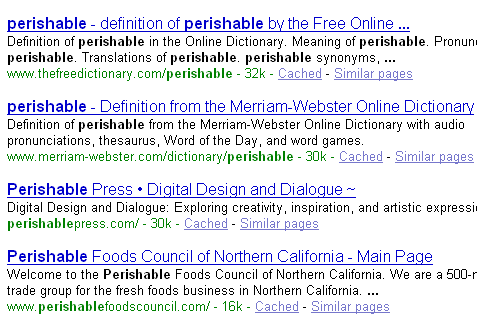
Title bullets bring a sense of solidity and permanence to the title. As you scan through a list of search results, title text appears mostly the same, leaving separators and other decorative characters to distinguish titles and grab attention. Decorative characters, when used properly, add a touch of flair and originality to your titles. I have seen many good (and bad) examples of this:
- * Design Netwerk *
- $$$ T “money” Dollaz $$$
- ^ ^Maddie^ ^’s Blog on Shine
These results don’t always make it to the top of the pile, but when they appear, it is hard to ignore them. These examples also demonstrate the effectiveness of underused and underrated characters. There are many visually interesting characters available from the keyboard; why the hyphen remains so popular is a bit of a mystery. For example, consider the humble bracket. Square brackets are extremely practical and serve well in many title configurations, for example:
- Toilet Huffing [Perishable Press]
- Monzilla Media [Archive] • Perishable Press
- Tag Archive for [gibbonz] • Perishable Press
- Search Results for [marz] • Perishable Press
..and so on. Again, the point of this exercise is to get creative with your title separators, increase the number of possibilities, and optimize your page titles for visual prominence in search-engine results. So, before closing this semi-casual stroll through the fascinating land of title separators, I would like to inspire you with a few ideas for separating and embellishing your titles:
- The Post Title +++ Blog Name
- The Post Title *** Blog Name
- The Post Title ::: Blog Name
- The Post Title ||| Blog Name
- The Post Title ___ Blog Name
- The Post Title $$$ Blog Name
- The Post Title /// Blog Name
- The Post Title <<< Blog Name
- The Post Title <-- Blog Name
- The Post Title <= Blog Name
- The Post Title <> Blog Name
- The Post Title at Blog Name
- The Post Title @ Blog Name
- The Post Title ~ Blog Name
- The Post Title • Blog Name
- The Post Title [Blog Name]
..ad nauseam! Hopefully, this article gets you thinking about the many possibilities for configuring and displaying your page titles. Bottom line: an easy way to sharpen your titles and stand out from the crowd involves using unique characters and intelligent separators to bring structure and clarity to your titles.
..and I’m out! (:!Thanks for reading!:)


24 responses to “Choosing the Best Title Separators”
Details. But, yes, it matters. Nice post.
I guess another related discussion could be about where you place the name of the site: in front or at the end of the title?
Some time ago I tried the bullet point as you do here at PP, but I felt later that it was not what I wanted. I then went back to the hyphen.
Oh, when you list some inspirationnal examples, why not go crazy and link to a ASCII characters collection? They might by some really great stuff there :p
Note: I vote the have the “Notify me of follow-up comments via email” checkbox checked by default!
I like some of the title ideas you’ve thrown out there. I’ve been a bullet man myself for a while, but I’m interested in trying the “Post Title @ Blog Title” for single pages.
Great post Jeff.. It inspired me to switch from using | to using the bullets as separators. It really stands out when you look at the title.. I’m surprised I didn’t think of that before.. I guess I thought special characters were not allowed or indexed.
Hmm, after reading this I think it’s definitely time to rethink headers on my blogs. The dot is great, but how about other ascii entries such as ÷ ø ‡ – they should make some nice seperators as well, what do you think?
@Aaron: An excellent choice, if I do say so myself! ;) Bullets are definitely allowed and indexed by the search engines, so no worries :)
@traveler: Yes, as Louis points out, there are many great ascii characters that would improve and enhance your titles. I especially like the
øand‡characters. Very nice! One thing that I should mention here is that it is important to specify the proper character set (utf-8, ISO 8859-1, etc.) before the title element, regardless of which characters you decide to use.@Geert: that is a good question. According to my reading, I am under the impression that, in general, the title of your post (page, whatever) is more likely to prove relevant in the search engines than is the name of your blog. Given that, it seems logical to place the blog name after the post title.
@Louis: That is an excellent idea! There are so many great characters to choose from, why limit ourselves to just a few! Also, since you are the only person to cast a vote concerning the default option for the “Subscribe to Comments”s feature, the choice is all yours! I don’t know why I haven’t thought of doing that myself, but nonetheless, the change has been made — the Subscribe box is now checked by default. It will be interesting to see the effect ;)
Thanks for the checkbox Jeff :D
Quick note concerning what you say just above this comment, that “it is important to specify the proper character set (utf-8, ISO 8859-1, etc.) before the title element“.
Are you sure that the position of the meta within the
headelement has any influence. My understanding of the browsers mechanisms is that the page starts rendering only after the head has entirely been loaded. This implies that the order is not important, like it isn’t with CSS – because the CSS is not interpreted until the file is all loaded.What do you think about it ?
You may be correct about this — I was too lazy to research it myself. I mentioned it for three reasons. First, most of the live (X)HTML markup that I have seen have placed the
content-typemetatag directly before the title tag. Most of the time, it seems to have been placed in that location quite deliberately. So, given this experience, as well a the fact the contents of the title tag must also be rendered by the browser, I have adopted the practice of specifying the charset immediately after theheadelement and just before thetitleelement. Finally, I also recall reading about this somewhere, but it didn’t occur to me to bother bookmarking the page. What you say makes logical sense, of course; I guess one of us needs to take the time to Google it! ;)After some researches, I think that you are right.
This W3C recommendation* explains that:
Therefore it seems that the meta elements are parsed on-the-fly. This is a pretty tricky thing to know.
Glad you pushed me to figure it out :)
*404 link removed:
http://www.w3.org/TR/REC-html40/charset.htmlThanks Louis! :)
Well nice post,, !! :)
I’ve rarely seen any page ranking with competitive keywords in the Google SERPs,, which are having special symbols in their Title Tags..!!!
Don’t you feel that ?? :D
And if some page(using special symbol) is ranking then the site is too old & have grown a big trust factor which lets the title tag ignored,,(in this case even if u dont use those words in title tag you will still rank) ,,
So in my opinion ,,(if you also consider SERPs position using special symbols in title you can use special symbols in your Title tag) any new websites or new blogs should not use special characters in the Titles.
‘m i right jeff ???